Hyphen
The orchestration layer that connects standalone financial products into unified payment and collection flows. Work spans the HyphenX platform design language, user migration workflows, authentication systems, notification architecture, and reusable component design across nXFlow, AVS, and AVS on nXFlow Integration Services.
Multi-Factor Authentication
Led end-to-end design of MFA/2FA across HyphenX, covering new client users, existing client-user migration, and a distinct Security Officer creation flow. The system connected Keycloak, Comms Manager, email notifications, and the HyphenX UI layer into one security journey.
Delivered full screen inventory across setup, OTP entry, success, expiry, and email states. Each step uses one primary action for progressive disclosure, while the Microsoft Authenticator QR code sits on a clean white surface to support reliable scanning inside the dark platform UI.
Notification Centre
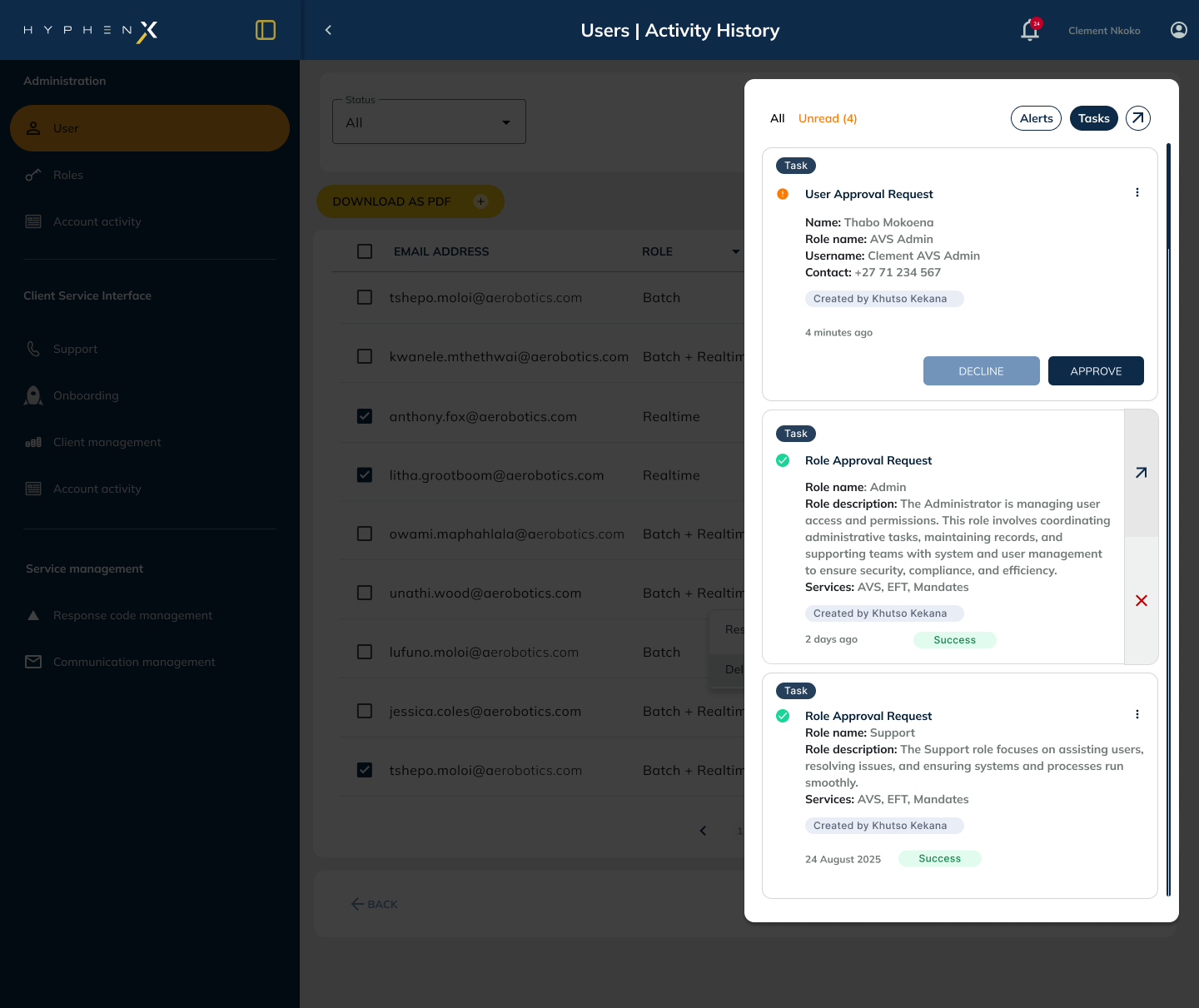
Designed a unified notification system for HyphenX to surface the right activity to the right role at the right time. Phase 1 focused on approval and task layers: admin approval workflows, task notification streams, and email templates that tie the experience together.
The system uses a triage model: unread items carry stronger weight, read items remain accessible, and tabs separate approvals, tasks, and system alerts. Rejections require comments for audit integrity, while email CTAs deep-link directly to the relevant task or approval.
Batch Upload Component
Built an enterprise-grade batch upload component consumed across nXFlow, AVS, and AVS on nXFlow. The work started with an audit of inconsistent upload patterns, then defined what is fixed by the design system and what product teams can configure.
The component covers idle, selected, uploading, validation, file error, row-level error, partial success, and full success states. Row-level error tables, downloadable failed-row files, correctable templates, and reference IDs support operational teams who need traceability after upload.
AVS User Migration
Designed the integration of a standalone AVS product into the HyphenX platform ecosystem, unifying products at different maturity stages under one visual language. AVS had a separate light-mode interface, while nXFlow was still in discovery and early design.
The migration flow gave administrators a clear user-list view, status filtering, review steps, invite triggering, and outcome confirmation. Before any verification record or migration action is committed, the system presents a summary confirmation state to build trust in financial workflows.
Password Reset
Redesigned a recovery flow where the happy path existed but edge cases were effectively dead ends. The previous journey had limited error feedback, no password strength guidance, and no branded reset or verification emails.
The updated flow covers empty submission, invalid format, unregistered email, rate limiting, resend, reset, creation, strength feedback, and branded transactional email. Guidance happens before submission: the primary action stays disabled until the password meets the minimum acceptable strength.
HyphenX Design Language
Reworked and enhanced the HyphenX brand CI specifically for enterprise product UI. The language had to scale across nXFlow, AVS, AVS on nXFlow, Notification Centre, onboarding flows, and all transactional email communications.
The system scopes amber to interactive meaning, uses layered dark surfaces for hierarchy, standardises the components that dominate daily workflows, and keeps mobile adaptability in mind through tap targets, spacing, and responsive component behaviour.
Product strategy, design systems, enterprise UX, and clear digital product delivery.
If you are hiring for a senior product design role or need a designer who can shape complex product work from strategy through interface detail, get in touch.
Discuss a role